Thursday, October 3, 2013

Cognos split crosstab corner cell Report Studio


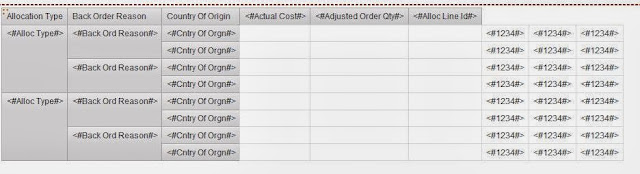
Below steps will show you how to split Crosstab corner cell (to add title).


1. Drag a text item from toolbox to the columns list, place it as left most column - Type required name


2. Same way drag text items as many as required


3. Select crosstab corner cell and change box type property as "None".


4. Select Column Body of all newly added text items and then change box type property as "None"


Finally you got the titles as you wanted!!! 

Tuesday, October 1, 2013

Cognos Frame work manager parameter map cache

If Parameter map is based on a query subject, where and when parameter map is written, underlying query will be executed

Cognos Framework manager parameter map maximum size limit

32768 characters is the maximum size limit of paramater map value for a single key

Monday, September 16, 2013

Cognos Report Studio not opening showing blank or report output not showing

In IE 10, Cognos might not work properly because of compatibility issue.

Solution:
Just click Compatibility View button which will be displayed in these cases just between URL bar and Refresh button.

Friday, June 7, 2013

Eclipse window builder installation guide set up tutorial sample simple program

In Eclipse, go to
Help -> Install new software
Work with -> Juno - http://download.eclipse.org/releases/juno
It will list available plugins, Navigate to General purpose, select all window builder components and swt, swing designer components and then click install.

Once installed, it will prompt for restart.

Below is the sample program

Create a new class with name One, Right Click on it from Package Explorer -> open with Window builder editor. Then insert below sample code to it and then click design tab in left bottom corner of editor window.


import java.awt.BorderLayout;
import javax.swing.JFrame;
import javax.swing.JTextArea;


public class One {    // Your class name

  public static void main(String[] args) {
    
    JFrame f = new JFrame("A JFrame");
    f.setSize(250, 250);
    f.setLocation(300,200);
    f.getContentPane().add(BorderLayout.CENTER, new JTextArea(10, 40));
    f.setVisible(true);
    
  }
}

Thursday, June 6, 2013

Eclipse window builder error - This is not a GUI class and cant be edited graphically

The parser parsed the compilation unit, but can't identify any GUI toolkit.
Possible reasons:
  • You open a compilation unit without any GUI, such as an empty class, data bean, etc.
  • Classpath of project is not valid, does not include all required toolkit libraries.
  • You attempt to open UI for toolkit, support for which is not installed in WindowBuilder.
    Use button Show UI Toolkits to install new toolkit.  

Even after installing Window builder components in eclipse, if you get this error, switch to code and insert below code and then switch to design


import java.awt.BorderLayout;
import javax.swing.JFrame;
import javax.swing.JTextArea;


public class One {    // Your class name

 public static void main(String[] args) {
   
   JFrame f = new JFrame("A JFrame");
   f.setSize(250, 250);
   f.setLocation(300,200);
   f.getContentPane().add(BorderLayout.CENTER, new JTextArea(10, 40));
   f.setVisible(true);
   
 }
}

Tuesday, May 14, 2013

cognos javascript multi select checkbox default checked all checkbox


Cognos Javascript prompt functions does not work with checkbox prompts. So you have to do using following functions. It is working for me.


<script type="text/javascript">
var fW = (typeof getFormWarpRequest == "function" ? getFormWarpRequest() : document.forms);

if ( !fW || fW == undefined) {
fW = ( formWarpRequest_THIS_ ? formWarpRequest_THIS_ : formWarpRequest_NS_ );
}

if (fW) {
var list = fW._oLstChoicesChkbox1;
if(list.length == null) {             // if there is only one option
list.checked = "checked";
list.onclick();
}
else {
for( i=0; i<list.length;i++) {
list[i].checked = "checked";
list[i].onclick();
}
}
}
</script>